Preview & conditional clean-up

Thank you for your suggestions.
There are no replies in this forum.

Preview & conditional clean-up

Postby Ville on Thu Sep 18, 2008 2:51 am

I've been using Total Uninstall now for some time and I'm generally quite happy with. However, there have recently been two incidents with it that have made me very cautious about using it. First time it wiped out good part of my registry to the point where I had to reinstall the operating system when I was removing ExpPrint utility. The second time, yesterday, it destroyed inDesign's entire plugin folder. Read more about it on my blog.

I've now looked at the competition and the bottom line is that they're not as good as Total Uninstall. However, the program absolutely has to have a preview where user can select or unselect items to be removed. I've looked in the configuration, etc. but haven't found such an option/feature. If the feature exists and I've missed it, please enlighten me, otherwise please add the feature to make it possible to use the software safely!
Ville
 

Re: Preview & conditional clean-up

Postby admin on Sat Sep 20, 2008 8:20 am

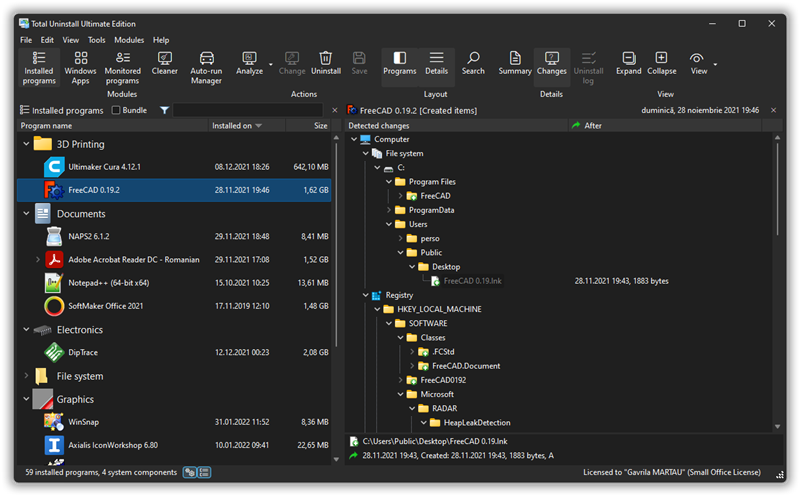
I think that "Detected changes" is the best preview. You can see there what TU detects as part of the analyzed installation. If you find something suspicious you can remove it from the log and will not be uninstalled. Also is recommended to send an email to support indicating the program in question to be analyzed in particular.
admin
Site Admin
 

Re: Preview & conditional clean-up

Postby Ville on Sat Sep 20, 2008 8:57 am

So the program never removes anything that is not listed in the "detected changes"? I sent a report via email on August 4, but I'll copy you again in case it didn't reach you.

Thanks!
Ville
 

Re: Preview & conditional clean-up

Postby admin on Sat Sep 20, 2008 9:28 am

Yes. It will revert only detected changes that are displayed. The expprint uninstall problem was caused by an error in the provided expprint msi database. The issue was fixed at that time.
I received your email and replied.
admin
Site Admin
 

Re: Preview & conditional clean-up

Postby Ville on Sat Sep 20, 2008 9:51 am

The reply must've been caught by the spam filter, unfortunately, since I didn't receive it. But this is good; if the "changes detected" shows what will be reverted, it will take care of this issue—it's as good as preview. I'll just make it a practice to review the detected changes before initiating uninstall. I'll follow up in my blog post on Saturday. Total Uninstall is still the best, and I'm glad this issue was resolved as well! Keep up the good work!
Ville
 

Re: Preview & conditional clean-up

Postby Ville on Sun Sep 21, 2008 7:27 am

I've updated my blog post to reflect the information from this thread.
Ville


Return to Suggestions


cron